Homepage Custom API Integration
You can integrate Posterizarr statistics into your Homepage dashboard using the customapi widget type. This allows you to display global stats or specific library stats directly on your dashboard.
Identifying Library Indices
To map specific libraries or collections in the examples below, you need to know their index in the folders array returned by the API.
- Open your browser and navigate to:
http://your-ip:8003/api/assets/stats?api_key=your_api_key - You will see a JSON response like this:
{
  "success": true,
  "stats": {
    "folders": [
      { "name": "Anime Shows", ... }, // Index [0]
      { "name": "TV Shows", ... },    // Index [1]
      { "name": "Kids Shows", ... },  // Index [2]
      ...
    ]
  }
}
- Count the folders starting from 0. For example:
- The first folder is
stats.folders[0] - The second folder is
stats.folders[1] - ... and so on.
- The first folder is
Live Status & Global Asset Statistics (Recommended)
This configuration combines Docker health monitoring with dual customapi widgets to provide a comprehensive, real-time service card:
- Docker Status: Displays live container status (e.g. RUNNING) in the card header.
- Asset Statistics (/api/assets/stats): Shows real-time counts for Posters, Seasons, Titlecards, and total asset disk Size.
- Scheduler & Run Monitor (/api/dashboard/all): Shows the current active mode (Running) and the relative countdown to the next scheduled run (Next Run).
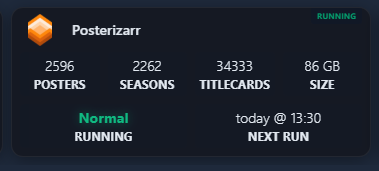
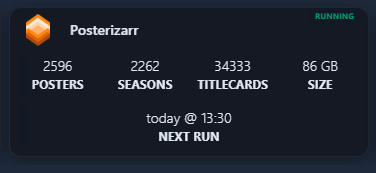
- Posterizarr:
    icon: https://raw.githubusercontent.com/fscorrupt/posterizarr/main/docs/images/Logo_Posterizarr.png
    href: https://posterizarr.your-domain.com # or http://your-ip:8003
    server: my-docker # Optional: matches your docker provider in Homepage's docker.yaml
    container: posterizarr # Optional: docker container name for live status badge
    widgets:
      - type: customapi
        url: http://your-ip:8003/api/assets/stats?api_key=your_api_key
        display: block
        mappings:
          - field: stats.posters
            label: Posters
          - field: stats.seasons
            label: Seasons
          - field: stats.titlecards
            label: Titlecards
          - field: stats.total_size
            label: Size
            format: bytes
      - type: customapi
        url: http://your-ip:8003/api/dashboard/all?api_key=your_api_key
        display: block
        mappings:
          - field: status.current_mode
            label: Running
          - field: scheduler_status.next_run
            label: Next Run
            format: date
            timeStyle: short
            locale: de-DE # Optional: adjust to your locale (e.g. en-US, de-DE) or use format: relativeDate
Overall Assets & Stats
This example shows how to combine both the overview (for missing assets) and stats (for counts) endpoints in a single service block using YAML anchors for a cleaner configuration.
Index may differ
This example uses stats.folders[8] for Collections. Please look at Identifying Library Indices to find the correct index for your system.
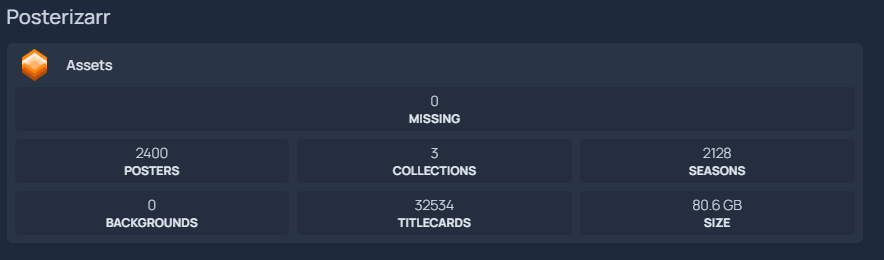
- Posterizarr:
    - Assets:
        icon: https://github.com/fscorrupt/posterizarr/blob/main/docs/images/Logo_Posterizarr.png?raw=true
        widgets:
          - type: customapi
            url: http://your-ip:8003/api/assets/overview?api_key=your_api_key
            display: block
            mappings:
              - field: categories.missing_assets.count
                label: Missing

          - &stats_api
            type: customapi
            url: http://your-ip:8003/api/assets/stats?api_key=your_api_key
            display: block
            mappings:
              - field: stats.posters
                label: Posters
              - field: stats.folders[8].poster_count
                label: Collections
              - field: stats.seasons
                label: Seasons

          - <<: *stats_api
            display: block
            mappings:
              - field: stats.backgrounds
                label: Backgrounds
              - field: stats.titlecards
                label: Titlecards
              - field: stats.total_size
                label: Size
                format: bytes
Global Statistics
To display overall statistics (Total Posters, Seasons, etc.), use the following configuration in your services.yaml:
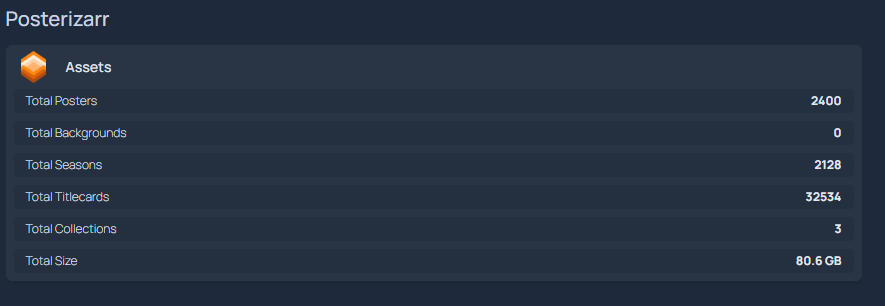
- Posterizarr Assets:
    icon: https://github.com/fscorrupt/posterizarr/blob/main/docs/images/Logo_Posterizarr.png?raw=true
    widget:
      type: customapi
      url: http://your-ip:8003/api/assets/stats?api_key=your_api_key
      display: list
      mappings:
        - field: stats.posters
          label: Total Posters
        - field: stats.backgrounds
          label: Total Backgrounds
        - field: stats.seasons
          label: Total Seasons
        - field: stats.titlecards
          label: Total Titlecards
        - field: stats.folders[8].poster_count
          label: Total Collections
        - field: stats.total_size
          label: Total Size
          format: bytes
Docker Labels Configuration
If you prefer to configure Homepage automatically via Docker labels instead of manually editing services.yaml, you can add the following labels to your Posterizarr container:
      - homepage.name=Posterizarr
      - homepage.icon=sh-posterizarr
      - homepage.href=${POSTERIZARR_URL}
      - homepage.siteMonitor=${POSTERIZARR_URL}
      - homepage.widget.type=customapi
      - homepage.widget.url=${POSTERIZARR_URL}/api/assets/stats?api_key=${POSTERIZARR_KEY}
      - homepage.widget.display=block
      - homepage.widget.mappings[0].field=stats.posters
      - homepage.widget.mappings[0].label=Posters
      - homepage.widget.mappings[1].field=stats.seasons
      - homepage.widget.mappings[1].label=Seasons
      - homepage.widget.mappings[2].field=stats.titlecards
      - homepage.widget.mappings[2].label=Titlecards
      - homepage.widget.mappings[3].field=stats.total_size
      - homepage.widget.mappings[3].label=Size
      - homepage.widget.mappings[3].format=bytes
Library-Specific Statistics
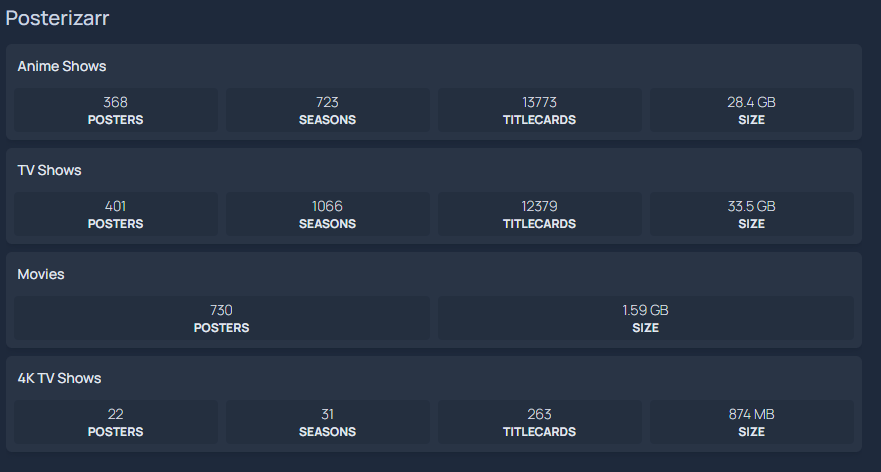
You can also create separate widgets for each of your libraries (Anime, TV Shows, Movies, etc.).
Example: Library Widgets
Here is an example configuration for multiple libraries using YAML anchors for efficiency:
- Posterizarr:
    - Anime Shows:
        widget: &lib_base  # <--- This defines the "lib_base" anchor
          type: customapi
          url: http://your-ip:8003/api/assets/stats?api_key=your_api_key
          mappings:
            - field: stats.folders[0].poster_count
              label: Posters
            - field: stats.folders[0].season_count
              label: Seasons
            - field: stats.folders[0].titlecard_count
              label: Titlecards
            - field: stats.folders[0].size
              label: Size
              format: bytes

    - TV Shows:
        widget:
          <<: *lib_base
          mappings:
            - field: stats.folders[1].poster_count # Only override the field index
              label: Posters
            - field: stats.folders[1].season_count
              label: Seasons
            - field: stats.folders[1].titlecard_count
              label: Titlecards
            - field: stats.folders[1].size
              label: Size
              format: bytes

    - Movies:
        widget:
          <<: *lib_base
          mappings:
            - field: stats.folders[3].poster_count
              label: Posters
            - field: stats.folders[3].size
              label: Size
              format: bytes

    - 4K TV Shows:
        widget:
          <<: *lib_base
          mappings:
            - field: stats.folders[5].poster_count
              label: Posters
            - field: stats.folders[5].season_count
              label: Seasons
            - field: stats.folders[5].titlecard_count
              label: Titlecards
            - field: stats.folders[5].size
              label: Size
              format: bytes
Example: Collections Widget
Since the index for Collections varies between systems, you must first identify it using the guide above. If your Collections are at index [8], your configuration would look like this:
- Posterizarr:
    - Collections:
        widget:
          type: customapi
          url: http://your-ip:8003/api/assets/stats?api_key=your_api_key
          mappings:
            - field: stats.folders[8].poster_count
              label: Collection Posters
            - field: stats.folders[8].size
              label: Size
              format: bytes
Custom CSS Styling (Dark Glassmorphism)
To achieve the sleek, modern glassmorphic look shown in the screenshots, Homepage allows adding a custom stylesheet via custom.css in your Homepage /config directory.
Add the following styles to /config/custom.css:
/* ==============================================================================
   Homepage Custom Aesthetic Styles
   Inspired by Dark Minimalist Glassmorphic Dashboard Design
   ============================================================================== */

/* Base & Background */
body {
  background-color: #0b0c10 !important;
  color: #e2e8f0 !important;
  font-family: -apple-system, BlinkMacSystemFont, "Segoe UI", Roboto, "Helvetica Neue", Arial, sans-serif !important;
  -webkit-font-smoothing: antialiased !important;
}

/* Tab Bar Navigation (Centered sleek pills) */
nav[role="tablist"],
div[role="tablist"],
.tabs-container {
  display: flex !important;
  justify-content: center !important;
  gap: 0.5rem !important;
  margin-top: 0.25rem !important;
  margin-bottom: 1.5rem !important;
}

/* Tab buttons */
nav[role="tablist"] a,
nav[role="tablist"] button,
div[role="tablist"] a,
div[role="tablist"] button {
  border-radius: 8px !important;
  padding: 0.45rem 2.2rem !important;
  font-weight: 500 !important;
  font-size: 0.95rem !important;
  transition: all 0.2s cubic-bezier(0.4, 0, 0.2, 1) !important;
  border: 1px solid rgba(255, 255, 255, 0.05) !important;
}

/* Service Cards - Dark Glassmorphism */
.service-card,
div[class*="group relative flex flex-col"],
div[class*="rounded-lg"][class*="border"] {
  background: rgba(18, 20, 26, 0.72) !important;
  backdrop-filter: blur(14px) !important;
  -webkit-backdrop-filter: blur(14px) !important;
  border: 1px solid rgba(255, 255, 255, 0.06) !important;
  border-radius: 12px !important;
  box-shadow: 0 4px 16px rgba(0, 0, 0, 0.35) !important;
  transition: transform 0.2s ease, border-color 0.2s ease, box-shadow 0.2s ease !important;
}

/* Service Card Hover Effect */
.service-card:hover,
div[class*="group relative flex flex-col"]:hover {
  transform: translateY(-2px) !important;
  border-color: rgba(255, 255, 255, 0.15) !important;
  box-shadow: 0 8px 24px rgba(0, 0, 0, 0.5) !important;
}

/* Category & Group Headers */
h2, .group-title, div[class*="font-semibold text-"] {
  letter-spacing: 0.03em !important;
  font-weight: 600 !important;
}

/* Status & Ping Indicators (Neon emerald glow) */
.ping,
div[class*="rounded-full"][class*="bg-emerald-"],
div[class*="rounded-full"][class*="bg-green-"] {
  box-shadow: 0 0 8px rgba(16, 185, 129, 0.4) !important;
}
Clean Formatting & Auto-Hide (Optional custom.js)
If you want the "Running" state indicator to automatically hide when Posterizarr is idle (leaving a clean centered "Next Run" display as shown in the screenshot), format friendly execution modes (e.g., LogoUpdater, Normal, Arr / Recent, Tautulli), and display clean countdown dates like today @ 13:30 or tomorrow @ 04:00, add this script to /config/custom.js:
// ==============================================================================
// Homepage Custom Scripts - Posterizarr Clean Formatting & Auto-Hide
// File: /config/custom.js
// ==============================================================================

const monthMap = {
  januar: 0, jan: 0, january: 0,
  februar: 1, feb: 1, february: 1,
  märz: 2, maerz: 2, mar: 2, march: 2,
  april: 3, apr: 3,
  mai: 4, may: 4,
  juni: 5, jun: 5, june: 5,
  juli: 6, jul: 6, july: 6,
  august: 7, aug: 7,
  september: 8, sep: 8, sept: 8,
  oktober: 9, okt: 9, oct: 9, october: 9,
  november: 10, nov: 10,
  dezember: 11, dez: 11, dec: 11, december: 11
};

function parseDateAny(str) {
  if (!str) return null;
  // 1. Standard ISO or date parse
  const d = new Date(str);
  if (!isNaN(d.getTime())) return d;

  // 2. German/localized date string (e.g. "17. September 2026 um 13:30")
  const m = str.match(/(\d{1,2})\.\s*([a-zA-ZäöüÄÖÜ]+)\s*(\d{4})[^\d]*(\d{1,2}):(\d{2})/);
  if (m) {
    const day = parseInt(m[1], 10);
    const mStr = m[2].toLowerCase();
    const month = monthMap[mStr] !== undefined ? monthMap[mStr] : 8;
    const year = parseInt(m[3], 10);
    const hour = parseInt(m[4], 10);
    const min = parseInt(m[5], 10);
    return new Date(year, month, day, hour, min);
  }
  return null;
}

function formatFriendlyNextRun(rawStr) {
  if (!rawStr) return rawStr;
  if (/^(today|tomorrow|on\s+[A-Za-z]+)\s*@/i.test(rawStr)) return rawStr;

  const timeMatch = rawStr.match(/(\d{1,2}):(\d{2})/);
  const timeStr = timeMatch ? `${timeMatch[1].padStart(2, '0')}:${timeMatch[2]}` : '';
  const target = parseDateAny(rawStr);

  if (!target) {
    return timeStr ? `today @ ${timeStr}` : rawStr;
  }

  const now = new Date();
  const targetMidnight = new Date(target.getFullYear(), target.getMonth(), target.getDate());
  const nowMidnight = new Date(now.getFullYear(), now.getMonth(), now.getDate());
  const diffDays = Math.round((targetMidnight.getTime() - nowMidnight.getTime()) / (1000 * 60 * 60 * 24));

  if (diffDays === 0) {
    return `today @ ${timeStr}`;
  } else if (diffDays === 1) {
    return `tomorrow @ ${timeStr}`;
  } else if (diffDays > 1 && diffDays < 7) {
    const days = ['Sun', 'Mon', 'Tue', 'Wed', 'Thu', 'Fri', 'Sat'];
    return `on ${days[target.getDay()]} @ ${timeStr}`;
  } else if (diffDays < 0) {
    return `today @ ${timeStr}`;
  } else {
    const months = ['Jan', 'Feb', 'Mar', 'Apr', 'May', 'Jun', 'Jul', 'Aug', 'Sep', 'Oct', 'Nov', 'Dec'];
    return `${target.getDate()}. ${months[target.getMonth()]} @ ${timeStr}`;
  }
}

function formatModeName(mode) {
  if (!mode) return '';
  const lower = mode.toLowerCase();
  if (lower === 'logoupdater') return 'LogoUpdater';
  if (lower === 'normal') return 'Normal';
  if (lower === 'tautulli') return 'Tautulli';
  if (lower === 'arr') return 'Arr / Recent';
  if (lower === 'manual') return 'Manual';
  if (lower === 'syncjelly') return 'Sync Jellyfin';
  if (lower === 'syncemby') return 'Sync Emby';
  if (lower === 'backup') return 'Backup';
  if (lower === 'testing') return 'Testing';
  if (lower === 'scheduled') return 'Scheduled';
  return mode.charAt(0).toUpperCase() + mode.slice(1);
}

function handlePosterizarrCard() {
  const blocks = document.querySelectorAll('.service-block, div[class*="service-block"]');
  blocks.forEach((block) => {
    // Find all leaf text nodes inside this block
    const leafNodes = Array.from(block.querySelectorAll('*')).filter(
      (el) => el.children.length === 0 && el.textContent.trim().length > 0
    );
    if (leafNodes.length < 2) return;

    // Identify the label element
    const labelEl = leafNodes.find((el) => {
      const t = el.textContent.trim().toUpperCase();
      return t === 'RUNNING' || t === 'MODE' || t === 'NEXT RUN' || t === 'NÄCHSTER LAUF';
    });
    if (!labelEl) return;

    const valueEl = leafNodes.find((el) => el !== labelEl);
    if (!valueEl) return;

    const labelText = labelEl.textContent.trim().toUpperCase();
    const rawVal = valueEl.textContent.trim();

    // 1. RUNNING BADGE: Hide if idle, style in emerald green if active
    if (labelText === 'RUNNING' || labelText === 'MODE') {
      const isIdle = !rawVal || rawVal === '-' || rawVal === 'null' || rawVal === 'false' || rawVal === '—';
      if (isIdle) {
        block.style.setProperty('display', 'none', 'important');
      } else {
        block.style.removeProperty('display');
        valueEl.style.color = '#10b981';
        valueEl.style.fontWeight = 'bold';
        valueEl.style.textShadow = '0 0 10px rgba(16, 185, 129, 0.4)';
        valueEl.textContent = formatModeName(rawVal);
      }
    }

    // 2. NEXT RUN BADGE: Clean format (today @ 13:30, tomorrow @ 13:30, on Sat @ 13:30)
    if (labelText === 'NEXT RUN' || labelText === 'NÄCHSTER LAUF') {
      const formatted = formatFriendlyNextRun(rawVal);
      if (formatted && formatted !== rawVal) {
        valueEl.textContent = formatted;
      }
    }
  });
}

let isRunning = false;
function runCustomScripts() {
  if (isRunning) return;
  isRunning = true;
  try {
    handlePosterizarrCard();
  } finally {
    setTimeout(() => {
      isRunning = false;
    }, 100);
  }
}

// Run immediately and observe DOM updates
if (typeof window !== "undefined") {
  if (document.readyState === "loading") {
    document.addEventListener("DOMContentLoaded", runCustomScripts);
  } else {
    runCustomScripts();
  }

  // Periodic check (every 500ms for first 5 seconds) to handle SWR background hydration
  let checkCount = 0;
  const interval = setInterval(() => {
    runCustomScripts();
    if (++checkCount > 10) clearInterval(interval);
  }, 500);

  const observer = new MutationObserver(() => {
    runCustomScripts();
  });

  observer.observe(document.body, { childList: true, subtree: true });
}
Available Fields
Asset Statistics (/api/assets/stats)
| Field | Description |
|---|---|
stats.posters |
Total number of posters across all libraries |
stats.seasons |
Total number of season posters |
stats.titlecards |
Total number of titlecards |
stats.backgrounds |
Total number of backgrounds |
stats.total_size |
Total size of all assets in bytes (use format: bytes) |
stats.folders[X].poster_count |
Number of posters in a specific library folder |
stats.folders[X].background_count |
Number of backgrounds in a specific library folder |
stats.folders[X].season_count |
Number of seasons in a specific TV folder |
stats.folders[X].titlecard_count |
Number of titlecards in a specific library folder |
stats.folders[X].size |
Size of assets in bytes for a specific folder |
stats.folders[X].total_count |
Total file count for a specific folder |
Dashboard & Scheduler (/api/dashboard/all)
| Field | Description |
|---|---|
status.current_mode |
Currently running mode (manual, scheduler, etc.) or -/null when idle |
scheduler_status.next_run |
Timestamp of the next scheduled run (use format: relativeDate) |
scheduler_status.enabled |
Boolean indicating if the background scheduler is active |
status.running |
Boolean indicating if any script process is actively running |
version.local |
Currently installed version |
version.is_update_available |
Boolean indicating if an update is available |
Tip
Use format: bytes in Homepage mappings for any field representing file size (e.g., stats.total_size or size) to ensure it displays in human-readable units (e.g., GB or MB). For timestamp fields like scheduler_status.next_run, use format: relativeDate to display dynamic counters like in 8 minutes.